Decorative Hand Drawn Shapes for Creative Projects
Decorative hand drawn shapes bring a unique, organic touch to any visual project. Unlike rigid geometric forms generated by software, these elements mimic the imperfections of human creativity. They add warmth, personality, and a sense of authenticity that flat design often lacks. Whether you are designing a wedding invitation, a blog post header, or a brand logo, incorporating these doodles can transform a sterile layout into something inviting and memorable.
What Makes These Elements Special?
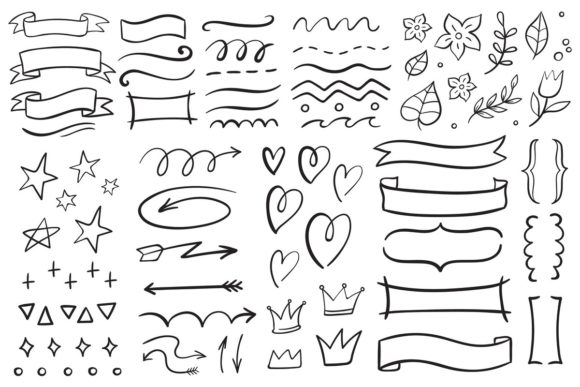
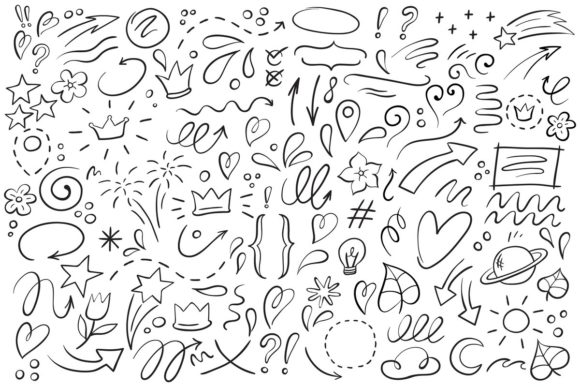
The appeal of decorative hand-drawn shapes lies in their ability to feel personal. When you look at a set of isolated vector illustration symbols, you aren't just seeing lines; you are seeing strokes made with intention. This collection features an outline crown, a playful doodle pointer, and a charming heart frame. These specific items serve distinct purposes while maintaining a cohesive style.
An outline crown suggests royalty or celebration without being overly heavy. A doodle pointer acts as a guide, drawing the viewer's eye exactly where you want it to go. Meanwhile, a heart frame provides a soft boundary for text or photos, perfect for social media posts or greeting cards. Beyond these, the set includes doodle lines, ink line arrows, and flower calligraphy sign sketches. Each element is designed to be versatile, allowing creators to mix and match styles freely.
The Value of Vector Format
One of the most critical aspects of this asset is its format. The product file includes one JPEG at 72ppi for quick previews and web use, but the true power lies in the included EPS10 file. Vector graphics are resolution-independent, meaning you can scale them up to billboard size or down to a tiny icon without losing quality. This flexibility is essential for professionals who need assets that adapt to various screen sizes and print dimensions.
If you need to separate elements, remove a specific shape, or edit the color, simply open the file in a vector editor like Adobe Illustrator. This level of control allows you to customize the design to fit your exact brand guidelines. You might decide to change the ink line arrow to match your company colors or delete the flower calligraphy sign sketch if it doesn't fit the current theme. Having editable source files empowers you to take ownership of the design rather than just using a static image.
Practical Applications for Creators and Businesses
Who benefits from using Decorative Hand Drawn Shapes? The answer is almost everyone. Beginners love them because they instantly elevate a design that might otherwise look too simple. Casual users find them easy to integrate into personal projects like scrapbooks or digital journals. For entrepreneurs and small business owners, these shapes offer a cost-effective way to create professional-looking marketing materials without hiring a custom illustrator.
Consider the needs of a blogger. A standard text block can be boring. By adding a doodle pointer next to a key quote or framing a testimonial with a heart frame, the content becomes more engaging. Marketers often use ink line arrows to highlight special offers or direct attention to a "Call to Action" button. The whimsical nature of the doodle lines can break up long paragraphs, making the reading experience more pleasant.
Educators and freelancers also find immense value in these tools. Teachers can use the outline crown to mark achievements on student worksheets or create fun headers for lesson plans. Freelance designers can bundle these elements into larger kits to sell to other creators, expanding their own product offerings. Even hobbyists working on DIY crafts can use the EPS10 file to create custom stickers, t-shirts, or home decor items.
Real-World Use Cases
- Social Media Graphics: Use the flower calligraphy sign sketch as a background element for Instagram stories. The organic lines soften the sharp edges of digital screens.
- Event Invitations: Frame the guest of honor's name within the heart frame. The outline crown adds a touch of elegance suitable for birthdays or anniversaries.
- Website Headers: Incorporate doodle lines to create dividers between sections of a landing page. This guides the user's scroll naturally.
- Print Materials: Scale the ink line arrow up for large posters or brochures. Because it is a vector, the edges will remain crisp even at large sizes.
Things to Consider Before You Start
While these assets are incredibly useful, there are a few practical considerations to keep in mind before integrating them into your workflow. First, ensure your design software supports the EPS10 format. Most modern vector editors handle this well, but older versions of some programs might struggle with complex paths.
Secondly, think about consistency. If your brand uses very clean, minimalist typography, a heavy, sketchy doodle might clash. However, if your brand voice is friendly and approachable, these shapes will complement your message perfectly. It is important to balance the hand-drawn aesthetic with the rest of your design elements so the final result looks intentional rather than messy.
Another consideration is the intended medium. While the JPEG version is great for quick previews, always use the vector file for any high-quality printing. Raster images like JPEGs can become pixelated when printed, whereas vectors maintain their sharpness. If you plan to use the shapes for embroidery or laser cutting, the vector paths are necessary to ensure the machine follows the lines accurately.
Customization Tips for Beginners
Don't be afraid to experiment. If the flower calligraphy sign sketch feels too busy, try reducing its opacity or changing it to a single color. You can combine the doodle pointer with the ink line arrow to create a custom directional indicator. The beauty of Decorative Hand Drawn Shapes is that they are meant to be flexible. They are not rigid rules but rather building blocks for your imagination.
Remember that these elements are designed to support your content, not overpower it. Use them to enhance clarity and emotion. A heart frame can make a message feel more caring, while an outline crown can make a title feel more significant. By understanding the role each shape plays, you can create designs that resonate with your audience on a deeper level.
Ultimately, whether you are a seasoned pro or just starting out, having access to a high-quality set of isolated vector illustration symbols can save you time and spark new ideas. With one JPEG for quick reference and one EPS10 for full editing capabilities, this resource covers all your bases. Take the time to explore the possibilities, and let the organic charm of hand-drawn art bring life to your next project.